
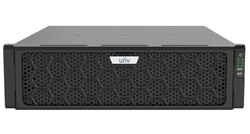
UG-I500-H16 - UNV Unicorn IoT 2.000 Kanal Video Yönetim Sistemi
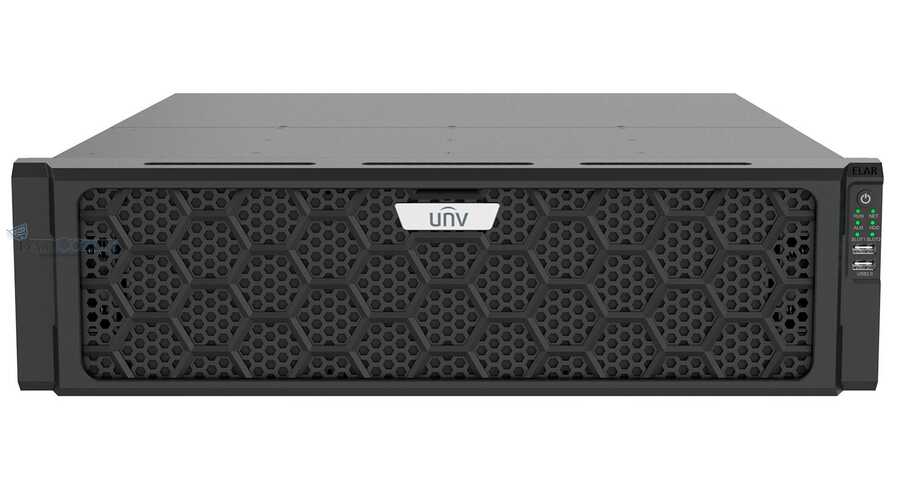
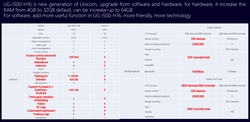
UNV Yeni Unicorn, UG-I500-H16 , IoT Entegre Yönetim Sistemi Video Sunucusu
Kararlılık: Linux İşletim Sistemi, çift bios, yedek güç, yedek sunucu bekleme
Uyumluluk: Üçüncü taraf IP Kameralar standart ONVIF ve RTSP ile desteklenir
Erişim: Tarayıcı/Sunucu, İstemci/Sunucu ve mobil istemciler (hem iOS hem de Android)
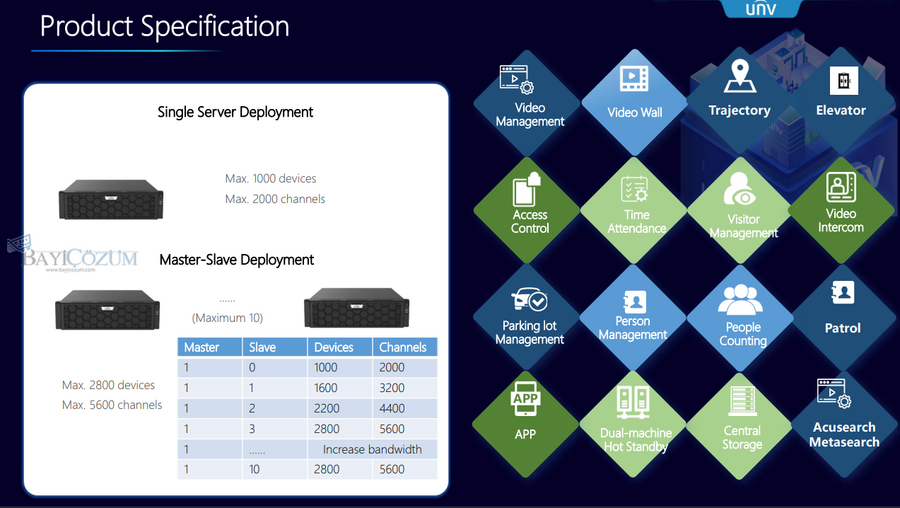
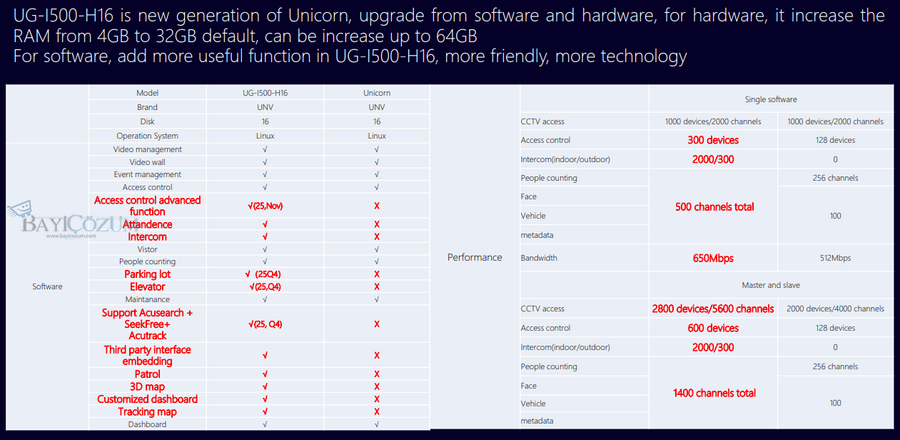
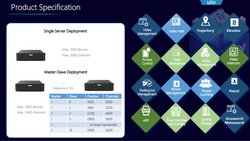
Bağlantı: 1000 cihaz bağlantısı, 2000 kamera 5.600 kamera kadar ağ videosu kanalı
Yönetim: IPC, NVR, ağ klavyesi, bulut cihazları, alarm kontrol paneli ve kapı erişimi
Plaka tanıma, yüz tanıma, interkom, alarm ve analiz raporlaması ve yönetimi
Depolama: 16 sabit disk HDD (EL/R AI)


- Ürün Özellikleri
- Tavsiye Et
- Resimler
- Döküman
-
Model
UG‑I500‑H16‑IN - Yeni UNV Unicorn
Akıllı IoT Entegre Yönetim Sunucusu
Özellikler
- Güçlü erişim: 2.000 video kanalını bağlayın ve yönetin.
- Güçlü yönetim: IPC, NVR, Akıllı Kutu, video duvar kontrol cihazı, yüz algılama erişim kontrol terminali, erişim kontrol cihazı, görüntülü interkom cihazı, giriş ve çıkış ANPR kamerası, ziyaretçi yönetim terminali, radar cihazı ve üçüncü taraf cihazı (alarm kontrol cihazı, erişim kontrol cihazı) vb. bağlayın ve yönetin.
- Güçlü depolama: 16 x SATA disk, yedekleme kaydını destekler.
- Güçlü uyumluluk: Onvif, RTSP
- Yüksek genişletilebilirlik: Birincil/kopya aygıt yönetimi genişletmesi, yönlendirme ve depolama kapasitesi genişletmesi
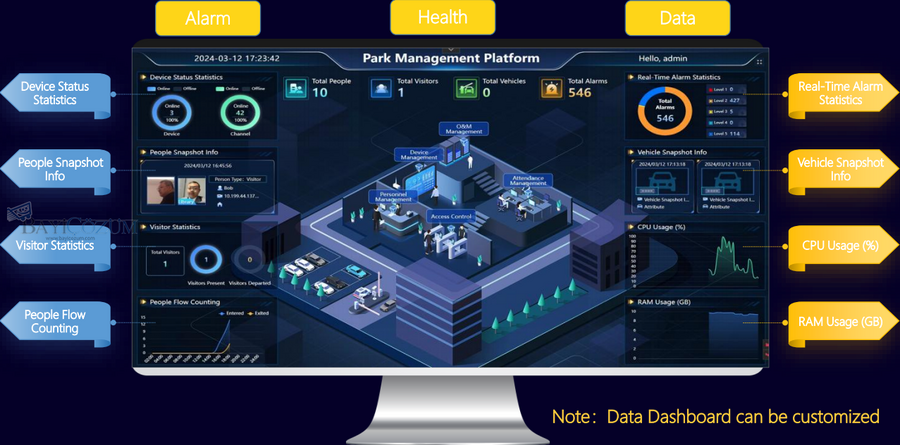
- Zengin işlevler: Canlı görüntü, oynatma, grup dizisi, görüntüleme, video duvarı, e-harita, 3D harita, çift yönlü ses, ses yayını ve alarm bağlantısı gibi temel işlevler; erişim kontrolü, ziyaretçi yönetimi, araç erişim yönetimi, personel yönetimi, kişi sayımı, park yönetimi, alarm sistemi ve O&M gibi genişletilmiş işlevler.
- Esnek erişim: PC istemcisi (C/S, B/S), mobil istemci (iOS, Android).
- Olağanüstü kararlılık: Linux sistemi, çift BIOS, çift güç modülü
- Güvenlik: Ağ hata toleransı, yük dengeleme, çoklu IP adresi, güvenli parola, IP adresi filtreleme.
- Gelişmiş İşletme ve Bakım: Sunucu durumu, cihaz/kanal çevrimiçi durumu, günlük araması, vb.
- Arayüzler: 4 x GE portu, 24 x alarm girişi, 8 x alarm çıkışı, 2 x USB 2.0, 2 x USB 3.0, 2 x HDMI, 1 x VGA.
Cihaz yönetimi - (EL/R AI)
Kodlama cihazları
1000
Video kanalları
2000
Bulut cihazları
256
Onvif cihazları
1000
Akıllı kanallar
500 (yüz algılama, LPR, çoklu hedef algılama dahil)
Erişim kontrol cihazları
300
Görüntülü interkom cihazları (kapı istasyonu)
300
Görüntülü interkom cihazları (kapalı istasyon)
2000
IPSAN(VX‑U)
10
Alarm kontrolörleri
800
Üçüncü taraf entegrasyon protokolleri
2 set SDK dahil 3 set
Replika sunucular
10
Cihaz yönetimi fonksiyonu
LAN cihazları: IPC, NVR, depolama cihazı, erişim kontrol cihazı, ekran kontrol cihazı, giriş ve çıkış ANPR kamerası, radar, Akıllı Kutu, görüntülü interkom cihazı, alarm kontrol cihazı, ziyaretçi yönetim terminali
Bulut cihazları: IPC, NVR ve yüz algılama erişim kontrol terminaliCihaz bilgilerini görüntüleyin: ad, IP adresi, cihaz modeli, cihaz durumu vb.Daha fazla işlem için cihazın web arayüzüne erişinDesteklenen protokoller: Uniview özel protokolü, OnvifAlarm denetleyicileri, erişim denetleyicileri, ziyaretçi terminalleri gibi üçüncü taraf cihazları bağlamak için protokollerCihaz bağlantı modu: IP+Port, DDNS+Port, EZCloud
Medya akışı
Alıcı bant genişliği (Mbps)
650
Yönlendirme bant genişliği (Mbps)
650
Depolama bant genişliği (Mbps)
650
Eşzamanlı merkezi depolama kanalları
250
Eşzamanlı merkezi oynatma kanalları
30
Eşler arası
P2P Alma bant genişliği (Mbps)
250
P2P Yönlendirme bant genişliği (Mbps)
250
Olay ve alarm
Saniye başına görüntü içermeyen olaylar/alarmlar
150
Saniye başına görüntülü olaylar/alarmlar
15
Müşterilere saniye başına olay/alarm gönderme (saniye başına olay/alarm)
15
Organizasyon yönetimi
Kuruluşlar
1000
Organizasyon seviyeleri
26
Kullanıcı yönetimi
Roller
500
Kullanıcılar
2000
Eşzamanlı çevrimiçi kullanıcılar
50
Kullanıcı yönetimi
Kullanıcıları ekleyin, düzenleyin, silin ve arayın
Kullanıcı listesini görüntüleBir kullanıcıya bir veya daha fazla rol ataKullanıcı önceliğini yapılandır (PTZ kontrolü için kullanılır)Diğer kullanıcıların parolalarını sıfırla (yalnızca yönetici tarafından kullanılabilir)Rolleri ata/geri al
Personel yönetimi
Kişiler
50000
Araç ve park yeri
Araçlar
10000
Otoparklar
4
Girişler ve çıkışlar
8
Şeritler
16
Veri depolama
Alarm kayıtları
10000000
İşlem günlükleri (saklama süresi)
6 ay
Erişim kontrol olayları
10000000
İnsan sayımı
10000000
Ziyaretçi kayıtları
10000000
Araç geçiş kayıtları
10000000
Katılım kayıtları
10000000
Kullanıcı girişi
Kullanıcı girişi
Çoklu istemci girişi
Güçlü parola politikası, ilk oturum açmada zorunlu parola sıfırlamaKullanıcı kilitleme/kilidini açmaOturum açma başarısızlığı sınırı, 5 başarısız oturum açma girişiminden sonra istemci IP'sini 5 dakika boyunca kilitler
Şifre yönetimi
Şifre yönetimi
Kullanıcının kendi şifresini değiştirmesine izin verir
Güvenlik soruları aracılığıyla şifreyi alınE-posta yoluyla şifreyi alın
Rol yönetimi
Rol yönetimi
Rolleri ekleyin, düzenleyin, silin, arayın
İşlev erişim iznini yapılandırın, farklı rollerin yalnızca belirtilen işlevlere erişmesine izin verin. Kaynak erişim iznini yapılandırın, farklı rollerin yalnızca belirtilen kaynaklara erişmesine izin verin. Rol listesini görüntüleyin.
Alarm alımı
Alarm alma fonksiyonu
Onvif/LAPI cihaz alarmlarını alın
Acil durumlarda alarmları manuel olarak tetikleyin. Üçüncü taraf arayüzlerle entegre olmak için alarm özelleştirmesi
Alarm aboneliği
Alarm aboneliği
Kullanıcıya göre alarm aboneliği
Harici etki alanına göre alarm aboneliği (daha yüksek platform, mevcut platformdan gelen alarmlara abone olabilir)
Alarm işlevselliği
Alarm işlevselliği
Akıllı olayları gerçek zamanlı olarak alın (yaya/motorlu taşıt/motorsuz taşıt algılama olayları)
Motorlu taşıt/motorsuz taşıt/yüz kayıtlarını arayınÇevre koruma alarmlarını arayın (Çizgiyi Geçme, İzinsiz Giriş, Alana Giriş, Alandan Çıkış)Yüz kayıtlarını arayınPersonel kayıtlarını arayınAlarm gönderme desteğiGerçek zamanlı açılır alarm penceresiGeçmiş alarmları arayın, alarmları onaylayınAlarm kayıtlarını alarm zamanına, alarm cihazına, alarm türüne, alarm seviyesine, işlem sonucuna, işlem kullanıcısına ve alarm açıklamasına göre arayınAlarm kayıtlarını dışa aktarın
Alarm bağlantı eylemleri
Alarm bağlantı eylemleri
Bağlantılı kameranın canlı videosunu açın
PTZVideo duvarında canlı video oynatBağlantılı kameranın kayıtlı videosunu oynatVideoyu kaydetYedek kaydıAlarmı çıkarE-posta gönderMetin gönderSesi çalKapıyı aç
Veri panosu
Veri panosu
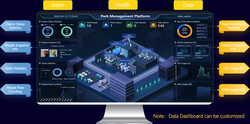
Özel başlık ve fonksiyonel modüller: cihaz yönetimi, depolama yapılandırması, kullanıcı yönetimi, temel yapılandırma, medya yapılandırması, video izleme, video duvarı, veri istatistikleri, veri araması, yüz algılama, alarm yapılandırması, vb.
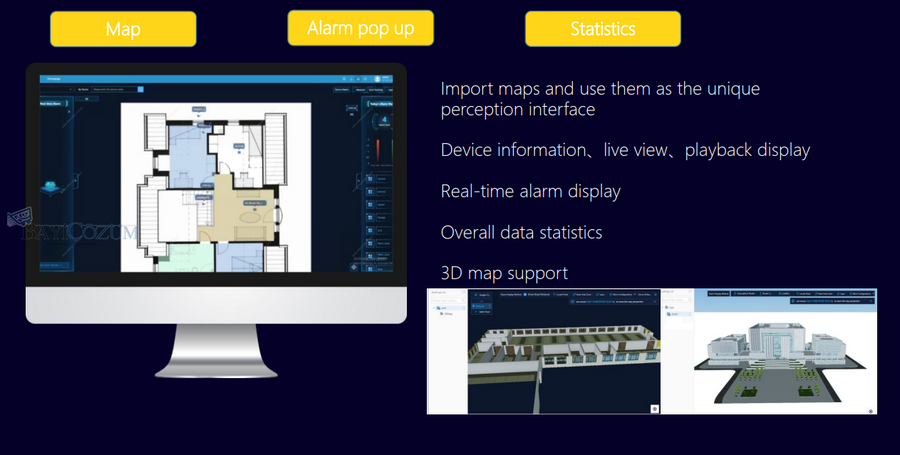
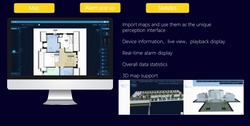
E-harita
Harita türü
Görüntü haritasını ve GIS çevrimiçi haritasını destekler
Resim formatı: JPEG, JPG, BMP görüntüleri, maksimum çözünürlük 8190 x 8190 GIS haritasını destekler 3D harita: 3D/2.5D modeller gltf ve 3dtiles formatlarını destekler, maksimum dosya boyutu 512 MB
İşlem türleri
Haritada canlı/kaydedilmiş videoları, görüntüleri ve alarmları görüntüleyin, alarmları alarm seviyesine ve alarm türüne göre filtreleyin
Haritada cihaz durumunu görüntüleyinHaritada cihazları arayın ve bulunGünlük alarm istatistiklerini görüntüleyinHaritada 6 bitişik kameradan canlı video izlemek için bir kamera seçin; canlı görüntü/oynatmada ızgara izlemeyi destekler
Personel yönetimi
Departman yönetimi
Departmanları ekleyin, düzenleyin, silin, arayın
Personel yönetimi
Temel bilgiler, kart bilgileri, oda bilgileri, parmak izi bilgileri dahil olmak üzere personel bilgilerini kaydedin
Özel personel nitelikleri
Kart yönetimi
Kartları kaydedin veya çekin
Oda yönetimi
Topluluk yönetimi
Toplulukları, binaları, birimleri, odaları ekleyin, düzenleyin, silin ve arayın
Odaları, ev sahipleri ve kiracılar dahil olmak üzere sakinlerle bağlayın
Bina yönetimi
Binaları ekleyin, silin, düzenleyin, arayın
Birim yönetimi
Birimleri ekleyin, silin, düzenleyin, arayın
Oda yönetimi
Odaları ekleyin, silin, düzenleyin, arayın
Odaları sakinlerle bağlayın
Sistem yönetimi
Temel yapılandırma
Sıcaklık birimini değiştir: Santigrat/Fahrenhayt
Zaman yapılandırması
Sunucu zaman yapılandırması (NTP sunucusu)
Tatil yönetimi
Sabit disk yapılandırması
Yerel disk, disk durumu/kullanımı, disk sağlık durumu
Yerel disklerle RAID yapılandırma; RAID'leri oluşturma, silme, yeniden oluşturma; RAID bilgileri (durum, kapasite)
Ağ yapılandırması
Ağ yapılandırması TCP/IP modunu destekler
HTTP, alarm bağlantı noktası yapılandırması NIC belirterek rotayı yapılandırın Tek etki alanlı çift NIC yapılandırmasını destekler
Kapasite genişlemesi
Birincil/kopya
Birincil/kopya yapılandırması
Otomatik cihaz tahsisiCihaz bağlantı kapasitesi genişletmesi: LAN ağı: IPC, NVR, yüz algılama erişim kontrol terminali, radar, Akıllı KUTU, giriş ve çıkış ANPR kamerası, görüntülü interkom cihazı); WAN ağı: LAPI cihaz bağlantısı (IPC, NVR, yüz algılama erişim kontrol terminali);Akış bant genişliği genişletmesi: akış alma/iletme/depolama bant genişliğiVeri türü genişletmesi: alarm, görüntü, olay (kişi sayma, yapılandırılmış) alma hızı
Basamaklı (AçıkAPI)
Kaynak basamaklandırma: Alt platformdan kaynakları alın ve özetleyin
Veri basamaklandırma: Alt platformdan bildirilen tüm verileri alınVideo basamaklandırma: Alt platformdaki video kaynaklarını görüntüleyinPTZ kontrolü: PTZ ön alımı dahil tüm PTZ kontrol işlevleriSes: Ses yayını, iki yönlü ses
Sistem bakımı
Sistem geri yükleme
Varsayılan: Geçerli ağ, kullanıcı ve olay yapılandırmasını korur
Fabrika varsayılanı: Tüm fabrika varsayılanlarını geri yükler
Sistem yükseltmesi (sunucu yükseltmesi)
Görüntü yedekleme: Görüntüleri yedekleyin ve geri yükleyin, yüz görüntülerini, araç görüntülerini destekler
Yerel yükseltme: kurulum paketi aracılığıyla yükseltme
Tanı bilgisi
İhracat hizmeti işlem günlükleri
Yapılandırma ve veri yedekleme
Otomatik veritabanı yedeklemesi. Yedekleme aralığı, bir gün, bir hafta
İstemci yapılandırması
Video
Video işleme modu: uyarlanabilir (varsayılan), akıcılık önceliği, gerçek zamanlı öncelik
Video akışı iletim politikası: uyarlanabilir Pencere sayısı ayarlanan değeri aştığında alt akışa otomatik geçiş Video akışı hizmeti seçim politikası: uyarlanabilir, önce doğrudan bağlantı
Filigran
Filigran: Canlı veya kayıtlı videoya özel filigran yerleştirir
Anlık görüntü fonksiyonu
Anlık görüntü modu: otomatik (varsayılan), manuel
Anlık görüntü biçimi: JPG (varsayılan), PNGSürekli anlık görüntü aralığı: 1‑10 sn (varsayılan: 1 sn)Sürekli anlık görüntüler: 2‑10 (varsayılan: 3)Özel anlık görüntü depolama yolu
Kayıt
Yerel kayıtların depolama yolu ve biçimi
İndirilen kayıtların depolama yolu ve biçimiKayıt biçimi: MP4 (varsayılan), TS
Alarm fonksiyonu
Alarm sesi yapılandırması (özel ses)
Ses çalma sayısı: 1‑10Açılır alarm ayarıSes dosyası biçimi: WAV ve MP3; dosya başına en fazla 30 MB
Görüntülü interkom
Görüntülü interkom zil sesinin süresini yapılandırın
Canlı görüntü
Oyun kontrolü
Kanala göre canlı videoyu oynatın ve görüntüleyin
1 / 4/ 6/ 8/ 9/ 10 / 13 / 16 / 17 / 36 / 64 tek ekranda pencere gösterimiÖzel pencere düzeniKoridor modunda 5 pencere düzeniMaksimum 3 yardımcı ekranHızlı geri çağırma için ayarları görünüm olarak kaydedin
Toplu oyun
Kamera dizisi (birden fazla kameranın sırayla bir pencerede oynaması), grup gösterimi
Sırayı görüntüleKamera sırası, video kaynaklarını ve sıra aralığını yapılandırmayı destekler
Anlık görüntü
Mevcut video görüntüsünü yakalar ve bilgisayara kaydeder
Özel anlık görüntüler ve anlık görüntü aralığıyla sürekli anlık görüntü
Canlı görüntü medya hizmeti politikası
Uyarlanabilir
Önce doğrudan bağlantı
Taşıma protokolü fonksiyonu
Uyarlanabilir
Canlı görüntüyü başlat/durdur
Tek kanallı canlı video, çok kanallı canlı video
Canlı görünümü sürdür
Canlı video akışını yeniden kurun
Yerel etki alanında canlı videoyu geri yükleyin (bir kamera veya XWARE aygıtının bağlantısının kesilmesinden veya sunucunun yeniden başlatılmasından sonra) Etki alanları arası canlı videoyu geri yükleyin (harici bir etki alanının bağlantısının kesilmesinden sonra)
Akış kapsülleme politikası
RTP akışı
Görüntü netliği
Ana akım, alt akım
Arka uç balık gözü eğriliğinin giderilmesi
Tavan montajı, duvar montajı, masaüstü montajı
Görüntüleme modu: 360° panoramik, 180° panoramik, Balık gözü ve PTZ
Panoramik bağlantı
Manuel izleme, otomatik izleme
Akıllı canlı görüntü
İnsan sayımı, LPR ve çoklu hedef tespitinde akıllı canlı görüntü
Canlı videoda akıllı işaretleme Özel nitelikler
Playback
Kayıt araması
Saklanan kayıtları ara
Kayıt yedeklerini arayınÖn uç kayıtlarını ve merkezi kayıtları arayınKayıtları kanala ve zaman aralığına göre arayın
Taşıma protokolü
TCP, UDP
Oynatma medya hizmeti politikası
Uyarlanabilir
Önce doğrudan bağlantı
Oynatma kontrolü
Başlangıç
DurdurDuraklatDevam Et1x ileriHızlı ileri (16×, 8×, 4×, 2×)Yavaş oynatma (0,5×, 0,25×, 0,125×)Hızlı geri sarma (1×, 2×, 4×, 8×, 16×)Videoda gezinmek için ilerleme çubuğunu sürükleyinSonraki kareyi oynatKare kare ileriYalnızca olay/alarm kayıtlarını oynatmaya atlaKayıt dosyalarını oynat, tam kare ileri, çıkarılan kare geri sarmaOynatmayı başlat, 30 saniye ileri, 30 saniye geri, değiştirilebilir ileri/geri sarma süresiÇok kanallı eşzamanlı oynatmaRöle aracılığıyla oynatma3 yardımcı monitörde oynatma
Kayıt indirme
Saklanan kayıtları ve yedek kayıtları yerel bilgisayara indirin
Aynı anda en fazla 2 kanalın kayıtlarını indirin
Kayıt indirme görevi
Kayıt indirme görevlerini görüntüle, sil
Çift yönlü ses/yayın
Çift yönlü ses
Kanallı çift yönlü ses
İstemcide çift yönlü ses/yayınÇift yönlü sesi başlat/durdurÇift yönlü sesi destekler
Ses yayını
Kanallara ses yayını
Performans özellikleri
İki yönlü ses ve yayın kanallarının toplam sayısı 25'i geçemez
Ağ oluşturma
LAN üzerinde LAPI, WAN üzerinde LAPI (P2P), LAN üzerinde Onvif
Ses
Ses formatı
Çift yönlü ses AAC'yi destekler
Çift yönlü ses G711a, G711u'yu destekler
PTZ
PTZ kontrolü
Sürükle-yakınlaştır
3B konumlandırmaÖnceden ayarlanmış konumları yapılandırın; kamera başına en fazla 255Ön ayarları alınDönme yönünü kontrol edinPTZ'yi kilitleyin/kilidini açınDönme hızını ayarlayınYakınlaştırın/uzaklaştırınYakın/uzak odaklayınİris ayarını yapın
Kontrol izni yönetimi
Yüksek öncelikli kullanıcıların, düşük öncelikli kullanıcılardan PTZ kontrolünü önceden almasını sağlar
Aynı öncelik düzeyine sahip kullanıcılar için yapılandırılabilir ön alma politikası PTZ kilitli olmadığında ve belirli bir süre boyunca hiçbir etkinlik olmadığında PTZ kontrolünü otomatik olarak serbest bırakır Yapılandırılabilir otomatik serbest bırakma süresi
Devriye rotası yapılandırması
Bir devriye rotasındaki maksimum komut sayısı sınırsızdır
Devriye komutu süresi, aralık: 5-300 saniye, varsayılan: 10 saniye, sonsuz dönüşü destekler Önceden ayarlanmış kalma süresi; aralık: 5-30 saniye, varsayılan: 10 saniye
Devriye planı
Önceden ayarlanmış devriyeyi yapılandırın
Rota patrolünü yapılandırın. Kamera başına en fazla bir devriye planı. Devriye planı başına en fazla 8 devriye rotası.
Otomatik koruma
Otomatik korumayı yapılandır
Belirli bir süre boşta kaldıktan sonra otomatik olarak koruma konumuna döner (süre yapılandırılabilir) Otomatik koruma programı başına en fazla 8 zaman aralığı
Oyuncu fonksiyonu
Oyuncu fonksiyonu
Yerel anlık görüntü
Yerel sürekli anlık görüntüSes seviyesi kontrolüDijital yakınlaştırmaYerel kayıt (yalnızca canlı video)
Yerel kayıt
Yerel bilgisayara kayıt
MP4 ve TS formatları
Kaydı başlat/durdurMedya akışı durduğunda kaydı otomatik olarak durdurur
Yerel dosya oynatma
Yerel dosya oynatma
MP4 ve TS formatları
Kaydı başlat/durdurMedya akışı durduğunda kaydı otomatik olarak durdurur
Merkezi depolama
Kamera depolama bilgisi yönetimi
Video kanalları için depolama yapılandırmasını ekleyin, silin, düzenleyin ve arayın (bulut cihazı hariç)
Depolama yapılandırması
Video kanalları için temel depolama alanını yapılandırın
Video kanalları için kayıt zamanlamasını yapılandırınVideo kanalları için kayıt zamanlamasını etkinleştirin/devre dışı bırakınVideo kanalları için merkezi kaydı etkinleştirin/devre dışı bırakın
Kayıt yedekleme
Video kanalları için manuel yedeklemeyi yapılandırın
Video kanalları için planlanmış yedeklemeyi yapılandırın
Video duvarı
Video duvar kaynak yönetimi
Video duvarı kaynaklarını ekleyin, düzenleyin, silin ve arayın
1‑10/13/16 pencerelerVideo duvarı önizlemesini destekler
Video duvar yapılandırması
Pencereleri açma/kapatma, gezinme, üst üste bindirme, yakınlaştırma/uzaklaştırma; her zaman üstte/altta görüntüleme, pencereyi bölme, tam ekrana geçme
Sahne yapılandırmasıEkran kontrolü: UA, UA‑A, MODBUS protokolleri aracılığıyla ekranları açma/kapatma, ekranları kapatma (gecikmeli), ekranları belirli bir zamanda açma/kapatma
LED/LCD birleştirme ekran kontrolü
Küçük piksel aralıklı LED'leri destekler
Sanal LED geliştirme
Kayan LED'i ayarla
Arka plan şeffaflığını ayarlayın: opak (%0) ve şeffaf (%100)
Video duvarında canlı görüntü
Video duvarındaki video kanallarının ana/alt akışlarını başlat/durdur
Video duvarındaki video duvar denetleyicilerinden gelen ana/alt akış çıkışını başlat/durdur
Video duvarında oynatma
Video duvarında oynatma ilerlemesini kontrol edin
Web/CS istemcisini kapatarak video duvarındaki oynatmayı durdurun.Kayıtları video duvarındaki alt platformdan oynatın.
Tek pencereli kamera dizisi
Başlat, durdur, duraklat, önceki/sonraki oynat
Sahne operasyonları
Başlangıç sahnesi
Medya hizmet politikası
Uyarlanabilir
Önce doğrudan bağlantı
Akış iletim protokolü
TCP, UDP
Ağ klavye kontrolü
Video duvarında canlı görüntü
PTZ kontrolü
Video duvar türü
DX video duvarı: kod çözücü/video duvarı denetleyicisinin kanalları kullanılarak oluşturuldu
Kameraları video duvarına sürükleyerek canlı videoyu başlatın; canlı görüntüyü ve video duvarındaki kamera dizisini desteklerMulti‑DC video duvarıKameraları video duvarına sürükleyerek canlı videoyu başlatın; canlı görüntüyü ve video duvarındaki kamera dizisini destekler
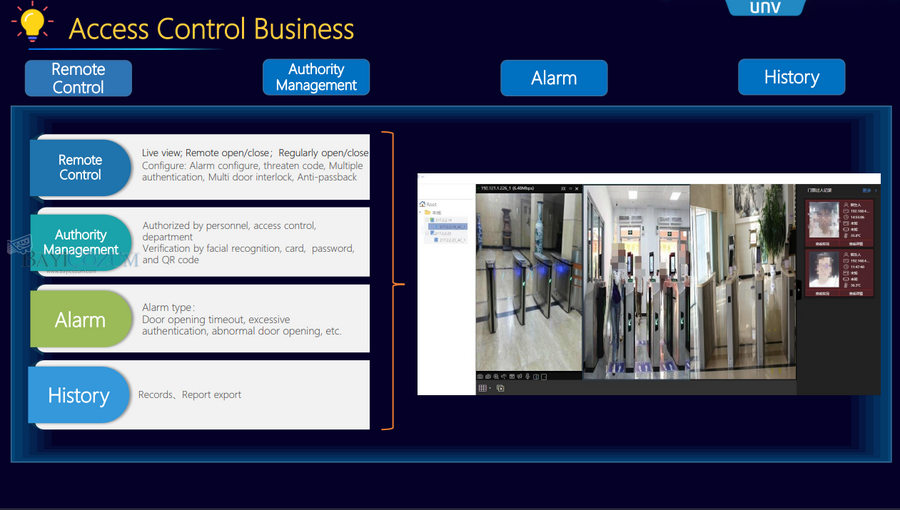
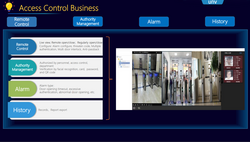
Erişim kontrolü
İzin grubu yönetimi
Erişim izni gruplarını ekleyin, silin, düzenleyin ve arayın
Erişim kontrol cihazlarına izinleri otomatik (varsayılan) veya manuel olarak eşitleyin. İzinleri kişi, kapı, departman ve bina bazında atayın.
Kimlik doğrulama modu
Yüz tanıma, kart, şifre ile kapı açma
Parmak iziyle kapıyı açın
Program şablonu
Program şablonlarını ekleyin, silin, düzenleyin ve arayın
Tatil şablonlarını yapılandırın
Gelişmiş uygulama
Açık tutma ve kapalı tutma yapılandırmasını destekler
Gerçek zamanlı izleme
Canlı video
Erişim kontrol cihazlarından canlı video izleyin, gerçek zamanlı erişim bilgilerini gösterin
Uzaktan kumanda
Kapıyı uzaktan açma/kapatma
Erişim kontrol olayı
Kayıtları geçen insanlar
Kişilerin cihazdan geçen kayıtları almasını sağlayın
Kayıtları geçen kişileri görüntüleyin, dışa aktarın
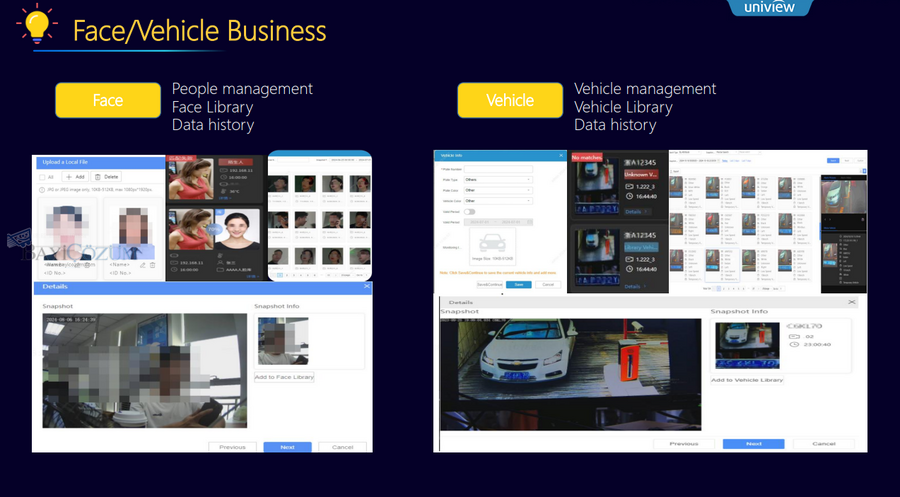
Yüz yönetimi
Görüntü ön işleme
Görüntü düzeltmeyi destekler
Yüz özelliği yönetimi
Erişim kontrol cihazları aracılığıyla özellikleri çıkarın, özellikleri senkronize edin
Yüz kütüphanesi yönetimi
Yüz kitaplıklarını ekleyin, silin, düzenleyin ve arayın; yüz kitaplıklarını cihazlarla senkronize edin; personel bilgilerini ekleyin, silin, düzenleyin ve arayın
Personel bilgi yönetimi
Önemli kişiler ve yüksek frekanslı kişiler dahil olmak üzere özel grupları yönetin
Ziyaretçi yönetimi
Ziyaretçi kaydı
Ziyaretçi kaydı, ziyaretçi çıkışı ve ziyaretçi verilerinin istemci üzerinden dışa aktarılması
Ziyaretçi ön kaydı
Mobil istemcide ziyaretçileri önceden kaydedin (uygulamanın Cloud-Edge modunu etkinleştirmesi gerekir)
Ziyaretçi yorumu
Mobil istemcide ziyaretçiyi inceleyin (uygulamanın Cloud-Edge modunu etkinleştirmesi gerekir)
Ziyaretçi bilgileri
Ziyaretçilerin yüz fotoğraflarını kaydedin
Plakaları kaydedin (erişim kontrolü ve giriş-çıkış ANPR kameralarıyla kullanılır)Ziyaretçi izinlerini yapılandırınÖznitelik alanlarını özelleştirin
Ziyaretçi kayıtları
Ziyaret kayıtları
Ziyaretçi kayıtlarını görüntüleyin, dışa aktarın
Alarm alt sistemi kaynağı
Bölge yönetimi
Bölgeleri ekleyin, silin, düzenleyin, arayın
Alarm alt sistemi çalışması
İstemcideki kontrol cihazı
Silahlandır/silahsızlandır, baypas et/baypası kaldır
Görüntülü interkom yapılandırması
Cihaz türü
İç mekan istasyonu, kapı istasyonu, bölge istasyonu
Cihaz çalışması
Cihazı odaya bağlayın, odayı iç mekan istasyonuna bağlayın, kapıyı kapı istasyonundan uzaktan açın
Çağrı alıcısı yönetimi
Çağrı alıcılarını ekleyin, silin, düzenleyin ve arayın
İletişim
Kişi yönetimi, iç mekan istasyonlarını aramak için kişileri kullanın
Görüntülü interkom çağrı yanıtlama
Çağrı yanıtlama
Kapı istasyonu çağrı yönetim merkezini çağırır, iç mekan istasyonu çağrı yönetim merkezini çağırır, yönetim merkezi çağrı yönetim merkezi iç mekan istasyonunu çağırır
Çağrı kayıtları
Çağrı ve yanıt kayıtlarını görüntüleyin
Görüntülü interkom alarmı
Alarm alımı
İç mekan istasyonlarından ve kapı istasyonlarından alarmları alın
Katılım yapılandırması
Katılım kuralları
Otomatik katılım hesaplama saatini ayarlayın (varsayılan: sabah 5)
Personel programı
Zaman dilimlerini ayarlayın, vardiyaları ve programları yönetin (vardiyaları personel üyelerine/departmanlara atayın)
Tatil
Tatil yapılandırması
Katılım yönetimi
Ayrılmak
Yaprakları/iş seyahatlerini idare edin
Tekrar oturum açın ve oturumu kapatın
Tekrar oturum açın veya oturumu kapatın, tekrar oturum açma ve kapatma kayıtlarını görüntüleyin
Katılım istatistikleri
Orijinal veriler
Orijinal katılım verilerini arayın, dışa aktarın
Katılım detayları
Arama yapın, ayrıntılı katılım verilerini dışa aktarın, katılımı hesaplayın
Katılım özeti
Katılım verilerini özetleyin, dışa aktarın
Katılım verileri
Veri aktarımı
Katılım verilerini bir Excel dosyasına aktarın
Veri senkronizasyonu
Verileri üçüncü taraf veritabanlarıyla (MySQL, PostgreSQL, SQLServer) senkronize edin
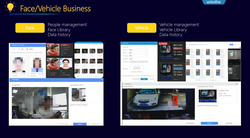
Araç yönetimi
Araç kütüphanesi yönetimi
Araç kütüphanelerini ekleyin, silin, düzenleyin ve arayın
Araç bilgi yönetimi
Araç ekleyin, silin, düzenleyin, arayın
Gerçek zamanlı veriler
Gerçek zamanlı izleme işlevi
Akıllı canlı görüntü (LPR kamerasının canlı videosunu görüntüler), kapıyı uzaktan açar, çekilen araç bilgilerini gösterir
Tarihsel veriler
Araç geçiş kayıtları fonksiyonu
Araç kayıtlarını arayın, dışa aktarın
Veri araması
Verileri özniteliğe, olay türüne vb. göre arayın.
Görüntüye göre yüz kayıtlarını arayın (NVR'nin görüntü arama özelliğini kullanarak) Bir kişinin e-haritadaki yörüngesini yüz görüntüsüyle arayın ve görüntüleyin; belirtilen bir kameranın kayıtlı videosunu oynatın
Alarm kayıtları
İzleme türüne, zamana vb. göre alarm kayıtlarını arayın.
Araç uygulaması
Araç istatistikleri
Radar-video füzyon kamerasından bildirilen hız olaylarına dayanarak hız yapan araçların sayısını sayar
Giriş ve çıkış ANPR kamerasından + radar-video füzyon kamerasından bildirilen araç geçiş olaylarına dayanarak geçen araç sayısını sayar
Araç uygulaması
Belirli bir aracı arayın
Araç yörüngesini e-haritada çizin ve görüntüleyin
Sistem parametre yapılandırması
Parametre yapılandırması
Hız yapan araçların otomatik olarak engelleme listesine eklenmesini destekler
Yüz izleme
İzleme görevi
Özel protokol aracılığıyla yüz kütüphaneleri ile izleme
VIID ile yüz izleme
Gerçek zamanlı veriler
Gerçek zamanlı izleme
Akıllı canlı görüntü (yüz algılama kamerasının canlı videosunu görüntüler), yakalanan kişi bilgilerini gösterir, izleme görevleri tarafından oluşturulan eşleşme/eşleşmeme alarmlarını gösterir
Kaynakları saymak
Sayım alanı yönetimi
İnsan akışı sayma alanı ve kalabalık yoğunluğu tespit alanı dahil
Alanları ekleyin, silin, düzenleyin, arayın
Sayma işlemi
Gerçek zamanlı istatistikler
Gerçek zamanlı istatistikler: İnsan sayma kameralarının canlı videosunu görüntüleyin, sayım sonuçlarını gösterin
İnsan akışı sayımı: giren/çıkan/izin verilen/mevcut kişi sayısını ve geçiş durumunu görüntüler.Kalabalık yoğunluğu algılama: izin verilen/kalıcı kişi sayısını ve alan durumunu görüntüler.
İstatistikleri raporla
(Yalnızca kişi akış sayımında kullanılabilir) Sayım istatistiklerini ay/gün/saat/dakika olarak görüntüleyin; istatistikleri grafik veya tablo olarak görüntüleyin
Temel otopark
Otopark cihazı
Giriş ve çıkış ANPR kameraları
Otopark yönetimi
Otopark yönetimi
Şerit yönetimi
Cihaz İşletme ve Bakımı
Cihaz tanılama bilgisi
Cihaz tanısı, tanılama bilgilerini dışa aktar
Kaynak durumu ekranı
Mevcut çevrimiçi/çevrimdışı durumunuz
Son çevrimdışı süreBelirtilen süre içindeki (maks. 30 gün)toplam çevrimdışı oluşum sayısıBelirtilen süre içindeki (maks. 30 gün)toplam çevrimdışı süre
Temel işlev
Cihaz yönetimi
Kenar kanallarını görüntüle
Canlı görüntü
Kenar hizmeti ve uygulama arasında P2P ve TURN
Playback
Kenar hizmeti ve uygulama arasında P2P ve TURN
Alarm
Bulut, uç hizmetten gelen alarmları alır ve uygulamaya iletir
Bulut kenarı işlevi
Bulut erişim kontrolü
Erişim izni yönetimi
Bulut ziyaretçi yönetimi
Ziyaretçileri uzaktan kaydedin, ziyaretçileri davet yoluyla kaydedin
Ziyaretçileri uzaktan inceleyin
Temel veri senkronizasyonu
Organizasyon
Temel organizasyon verilerini senkronize edin
Personel
Temel personel ve departman verilerini senkronize edin
NDAA
NDAA
Destek
Donanım parametreleri
Ana işlemci
Intel Core i3‑8100 @3.6GHz
İşletim sistemi
Ubuntu‑24.04.2
Hafıza
32 GB
Sistem diski
SSD 128GB
Depolama diski
SATA x 16
eSATA x 1, miniSAS x 2
Video çıkışı
HDMI x 2, VGA x 1 (yerel kod çözme şu anda mevcut değil)
Ağ arayüzü
GbE x 4
USB
USB2.0 x 2, USB3.0 x 2
Alarm girişi/çıkışı
24 x alarm girişi, 8 x alarm çıkışı
Ses arayüzü
RCA 1 x giriş, 1 x çıkış
Seri arayüz
RS232: RJ45 x 1
RS485: RJ45 x 1
Ağırlık
< 13 kg
Çalışma sıcaklığı
-10°C ila +55°C
Çalışma nemi
%10 ila %90 (yoğuşmasız)
Toplam tüketim
≤ 150W (sabit disk hariç)
Güç kaynağı
Standart: bir güç modülü
İsteğe bağlı: 1+1 yedeklilik
-
 Teknik Özellikler Veri Dosyası